Zero-Lag High-Fidelity Rendering: Engineering Asset-Dense Product Builders That Load Instantly in a Customer's Web Browser

When a B2B buyer lands on an industrial e-commerce site, they expect an elite digital experience. If they are configuring a complex heavy vehicle, a custom modular building, or an asset-dense power distribution system, they want to see a rich, photorealistic 3D representation. They want true-to-life reflections, crisp textures, and accurate physical geometry.
However, high fidelity frequently comes with a massive performance tax. If your 3D platform takes ten seconds to load, hesitates every time a user adds an accessory, or stutters at a sluggish fifteen frames per second during rotation, your digital buyer will abandon the tool. In digital commerce, user frustration correlates directly with lost revenue.
Achieving a zero-lag web configurator requires moving past basic web setups. By deploying cutting-edge front-end optimization techniques like progressive asset streaming, dynamic asset pooling, and intelligent GPU memory management, you can build an incredibly dense 3D product builder that loads in milliseconds and runs flawlessly on any standard web browser.
The architectural bottlenecks that stall web-based 3D engines
Most lagging product configurators suffer from a common flaw: they treat web graphics the same way they treat offline desktop applications. Forcing a browser to handle dense 3D models without web-specific optimization creates three major performance barriers:
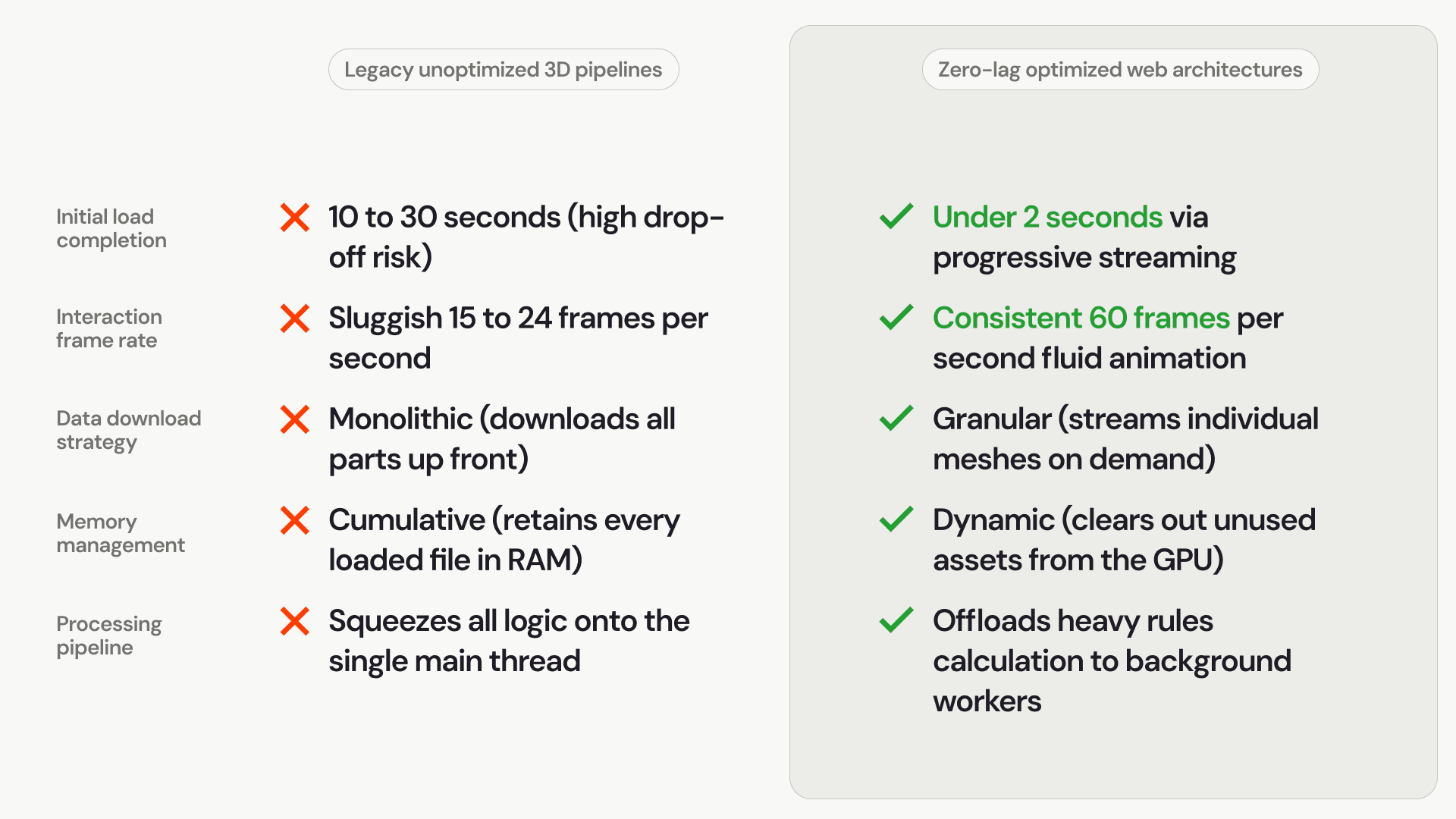
The initial payload freeze: When a website tries to download every single possible product variation, texture file, and structural component up front, the browser locks up. The user is left staring at a blank loading bar, causing immediate site abandonment.
Main-thread processing choke: Standard web browsers execute JavaScript on a single "main thread." If your 3D engine handles heavy database calculations, complex geometric math, and visual rendering changes on this same thread, the user interface will stutter and lock up during interaction.
Graphics card memory exhaustion: Web browsers operate inside strict, sandboxed memory environments. If a product builder continuously loads new high-resolution texture maps without clearing out old data, the system quickly exhausts the device's graphics memory, causing the browser tab to crash entirely.
Comparison: Unoptimized graphic pipelines vs. zero-lag architectures
Building a responsive, asset-dense web tool requires a complete shift from traditional heavy loading models to an on-demand, highly optimized data architecture:
Engineering strategies for instant browser rendering
Eliminating interface lag while maintaining stunning visual fidelity relies on managing how data travels over the network and how it passes into the user's graphics processor.
1. Implementing progressive mesh streaming and lazy loading
A user cannot look at every product option simultaneously. A zero-lag architecture takes advantage of this by only downloading the base chassis model during the initial page load. Specialized accessories, internal components, and alternative finishes remain stored on a cloud delivery network. The software lazily streams these individual assets into the browser only when a customer clicks a specific option, keeping the initial page weight remarkably light.
2. Offloading rules engine calculations to Web Workers
To keep your 3D model spinning at a silky-smooth sixty frames per second, the main execution thread must remain completely unburdened. Advanced custom software solutions utilize Web Workers—independent JavaScript threads running quietly in the background. When a user modifies a dimension, the background worker handles the complex business logic, pricing matrices, and tolerance checks, passing only the final coordinate changes back to the visual canvas.
3. Visual instancing for repetitive sub-components
Industrial equipment frequently features highly repetitive parts, such as arrays of cooling fins, mounting bolts, or interior structural rivets. Instead of forcing the browser to load hundreds of separate individual 3D objects, developers utilize a technique called hardware instancing. This instructs the graphics card to render a single part file multiple times across a map of coordinates, allowing you to display highly complex, detailed assemblies with virtually zero extra performance cost.
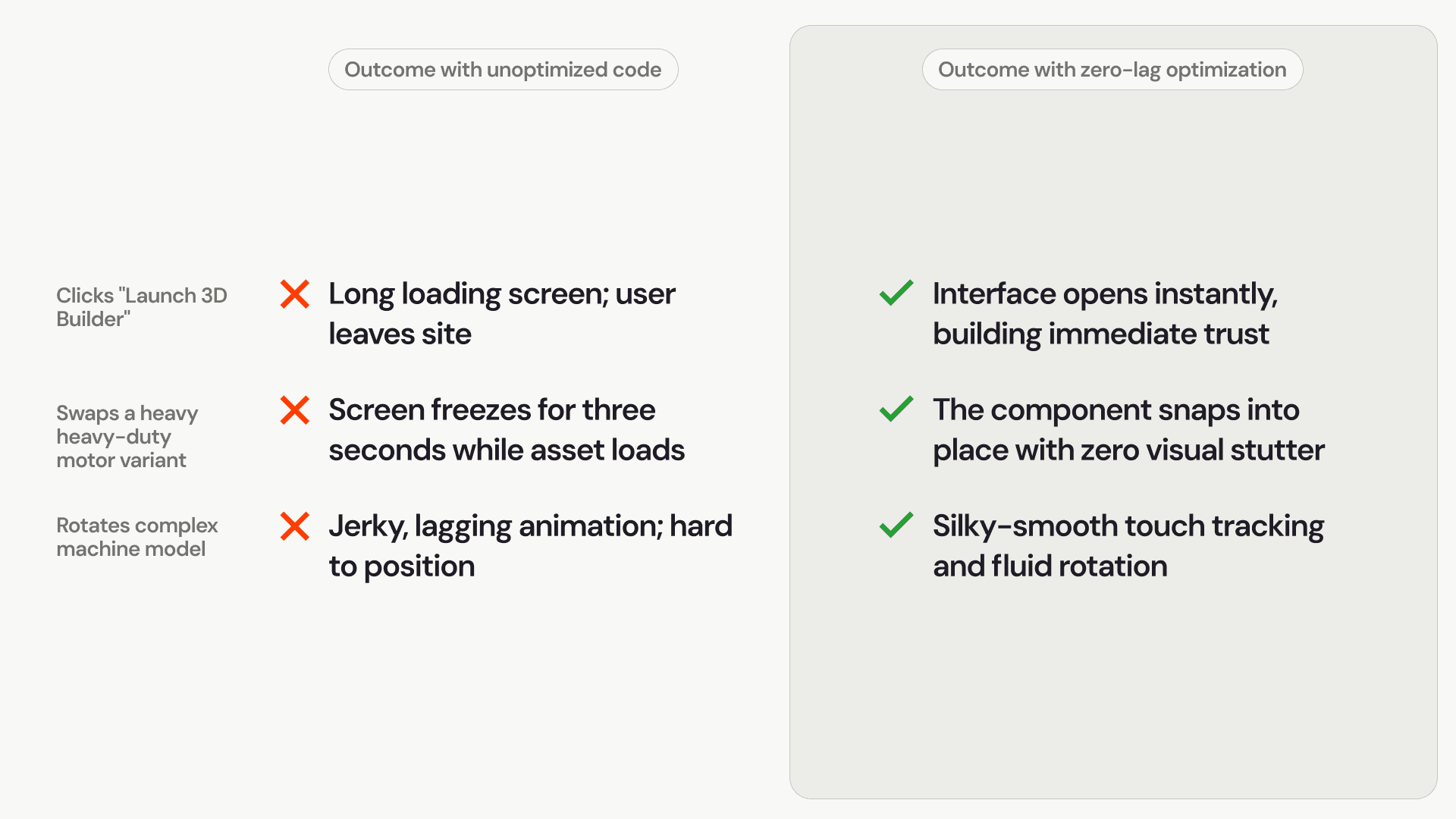
Maximizing conversion rates through performance optimization
The underlying code performance of your online catalog directly influences user engagement, configuration completion rates, and sales conversions:
Unlocking frictionless digital commerce
Forcing your B2B buyers to navigate slow, heavy, and stuttering web interfaces to build custom equipment severely dampens your digital sales potential. No matter how accurate your engineering rules are, a tool that feels slow to respond will fail to capture market share.
Upgrading your online catalog to a high-performance, zero-lag 3D rendering architecture bridges the gap between high-fidelity realism and rapid web performance. By streaming assets intelligently, utilizing background thread processing, and optimizing how the graphics card handles data, you can deliver an immersive, photorealistic configuration experience that responds instantly to every customer interaction, driving faster quotes and error-free checkout.