From CAD to Photorealistic eCommerce: Optimizing High-Fidelity 3D Models for Real-Time Web Configurations

The commercial value of a high-fidelity 3D product configurator is undeniable. When a B2B buyer can interact with a photorealistic, true-to-scale digital twin of an industrial enclosure, heavy machinery assembly, or modular data center, sales friction drops dramatically. Visual certainty builds buying confidence, accelerates quoting, and eliminates ordering errors.
However, a major technical bottleneck prevents many manufacturers from launching these high-fidelity visual tools: the weight of engineering data.
If you attempt to load raw Computer-Aided Design (CAD) files directly into a web browser, your e-commerce platform will crawl to a halt. A heavy product model can take minutes to load, stall mobile devices, and cause buyers to abandon your website out of frustration.
Deploying a high-performance visual configurator requires a strict process of data translation. You must optimize asset-dense engineering data into lightweight, photorealistic assets that render instantly in a web browser while preserving every critical detail.
The technical roadblock: Why raw engineering files break web graphics
Internal engineering models are designed for manufacturing accuracy, not web performance. A single industrial pump or complex server rack assembly can contain thousands of hidden components, microscopic details, and dense solid-geometry coordinates.
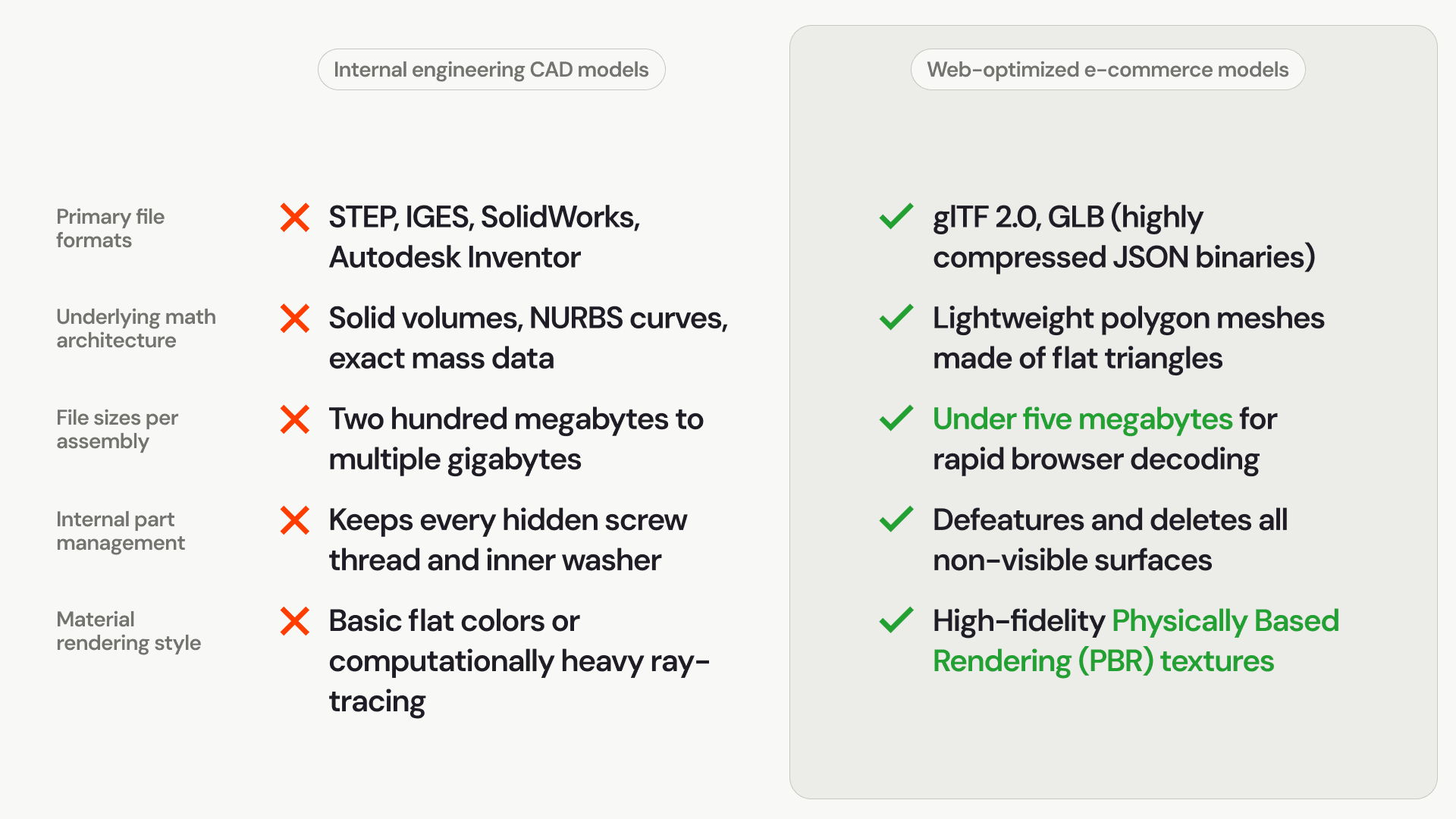
The solid geometry bottleneck: CAD files use mathematical boundary representations to define solid mass, calculating exact material volumes. Web browsers rely on lightweight polygon meshes (flat triangles connected together) to render shapes. Forcing a browser to parse solid mass data causes severe processing delays.
The hidden polygon penalty: A raw production file includes every internal screw thread, interior bracket flange, and structural rivet hidden inside the machine casing. Loading these invisible parts wastes critical memory on assets the buyer will never see on screen.
Unoptimized texture coordinates: Real-world materials require proper UV mapping—the mathematical process of wrapping a flat 2D texture image cleanly around a 3D object shape. Raw CAD data lacks this coordination, resulting in flat, artificial-looking surfaces that fail to mimic brushed metals, powder coatings, or clear plastics.
Comparison: Raw CAD data structures vs. web-optimized 3D assets
Transforming your product catalog from an internal engineering repository into an active online sales tool requires a completely different approach to managing file structures and processing loads:
Strategies for thinning data without sacrificing photorealism
Optimizing high-fidelity assets for e-commerce is a careful balance of removing mathematical weight while using advanced web shading techniques to retain absolute visual depth and accuracy.
1. Automated mesh decimation and polygon reduction
The first step is running the raw files through mesh decimation software to drastically reduce the total triangle count. Complex, flat manufacturing surfaces can often be simplified from millions of polygons down to a few thousand without altering the external silhouette of the product shape. This keeps the user experience smooth at a reliable sixty frames per second during product rotation.
2. Strict visual defeature profiling
To protect web performance, you must aggressively strip out hidden data. Any component completely enclosed inside a steel housing or solid frame should be deleted from the web export. Microscopic bevels, manufacturing stamps, and internal fastener threads are entirely removed, reducing the file memory signature to a fraction of its original size.
3. Leveraging Physically Based Rendering (PBR) workflows
Instead of relying on dense geometric detail to show surface complexity, web developers use high-fidelity PBR textures. By applying lightweight 2D texture maps (such as normal, roughness, and metallic maps), you can simulate realistic surface details—like a diamond-plate steel pattern, brushed aluminum, or rough weld seams—directly onto a flat polygon face with zero polygon performance tax.
4. Implementing the glTF 2.0 file standard
The global standard for web-native 3D graphics is glTF (or its single-binary version, GLB). Known as the "JPEG of 3D," this format is explicitly optimized for rapid transmission over the internet, allowing standard browser graphics layers to unpack, read, and render complex products on screen almost instantaneously.
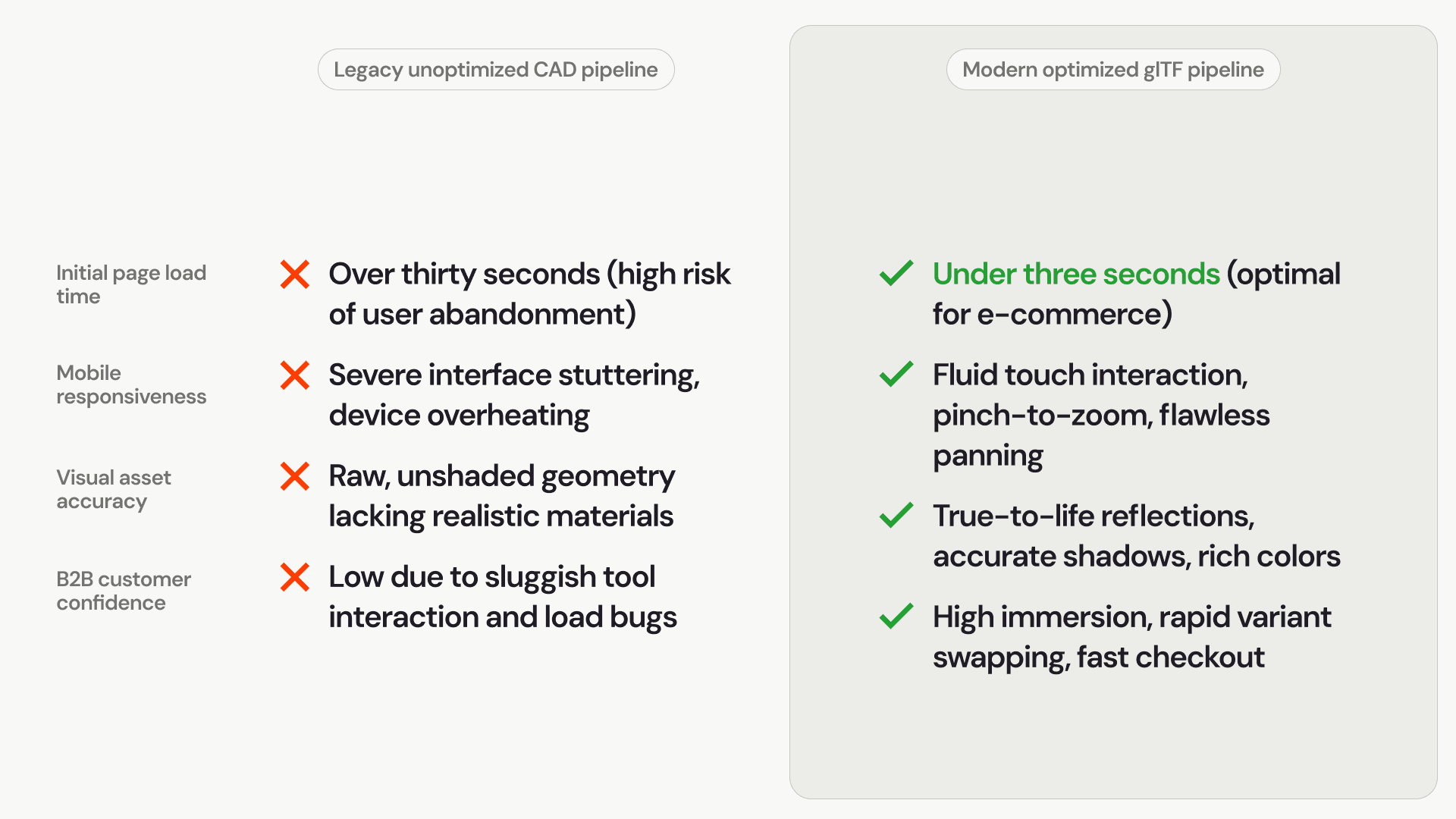
Comparing user experience outcomes across architectures
The pipeline architecture choices you make directly dictate user retention and sales conversion rates:
Delivering frictionless B2B buying experiences
Forcing your B2B customers to wrestle with slow, lagging web interfaces to configure custom equipment directly harms your digital revenue. If your visual tools fail to load immediately on a buyer's screen, they will step away from your website.
Optimizing your data pipeline into high-fidelity, web-optimized asset models bridges the gap between complex engineering and digital commerce. By stripping away hidden structural data and utilizing advanced, lightweight rendering formats, you can launch a beautifully fluid, photorealistic 3D configurator that runs flawlessly on any browser, turning complex technical options into rapid, error-free sales.